APT Framework: Getting Started
Xylo's Productivity Kit is built on the APT Framework (Areas, Projects, Tasks) — three layers that organize everything from solo work to distributed teams.
Get the Free Template
Notion Marketplace: Xylo APT Productivity Kit
Need help? Join Support Chat
How It Works
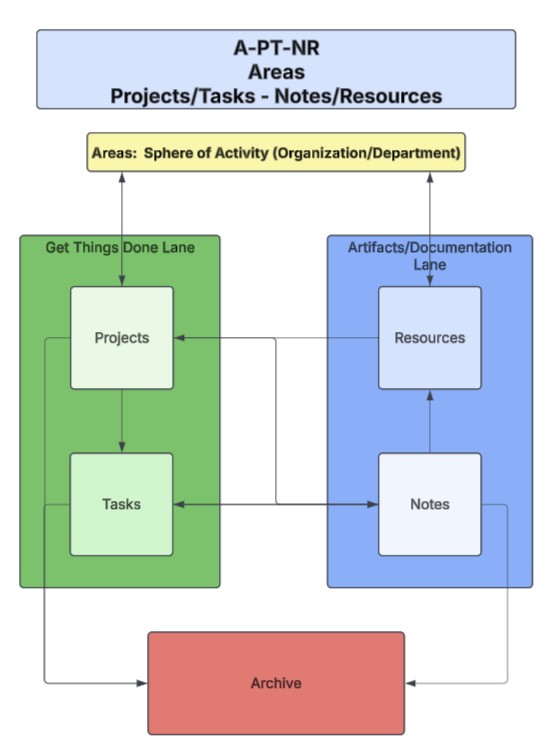
- Areas — Stable domains of responsibility (Health, Engineering, Client Work)
- Projects — Focused efforts within an Area, time-bound or ongoing
- Tasks — Individual steps that move Projects forward
- Notes — Working documents, meeting summaries, drafts
- Resources — Polished references, SOPs, templates
Everything connects: Tasks → Projects → Areas. The dashboard automatically shows each person only what's relevant to them.
Getting Started
Week 1: Foundation
- Define 3-5 Areas
- Migrate 1-2 active projects
- Use daily for one week
Weeks 2-4: Build Habits
- Daily: Check task dashboard every morning
- Weekly: Review projects, update statuses
- Ongoing: Capture new items in the system
Month 2+: Expand
- Add projects and documentation
- Invite team members
- Customize views for different roles
Key: Start using before it's perfect. Adjust as you go.
Common Mistakes
- Too many Areas → Start with 3-5. Split later if needed.
- Projects too vague → "Improve Documentation" is an Area. "Document API v2" is a Project.
- Databases not connected → Every Task must link to a Project, every Project to an Area.
- Over-customizing before using → Run the template as-is for two weeks. Then customize.
Extending the System
XPK is built for seamless extension — CRM, OKRs, Content Pipelines, and more.
Need a custom build? Reach out through support chat to discuss consulting services.